Can CB Radio Interfere TV?: Uncovering the Truth
Yes, CB radio can interfere with TV signals. This interference happens due to overlapping frequencies.
But why does this occur, and what can you do about it? CB radios, or Citizen Band radios, operate on specific frequencies. Sometimes, these frequencies overlap with TV signals, causing disruptions. This interference can be annoying, especially when you are watching your favorite show.
Understanding the reasons behind this interference can help you find solutions. We’ll explore how CB radios and TVs can clash, and what steps you can take to minimize this issue. Stay tuned to learn more and enjoy a clearer TV viewing experience.
Introduction To Cb Radio
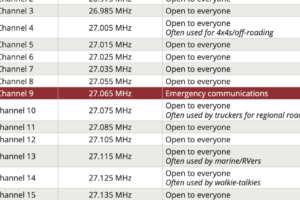
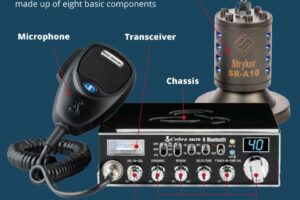
Citizens Band (CB) radio has been a staple in communication for decades. It allows for short-distance two-way communication. Truckers, hobbyists, and emergency services rely on it. CB radio operates on 40 shared channels within the 27 MHz band.
History And Development
CB radio started in the 1940s. It became popular in the 1970s. The FCC established the Citizens Radio Service. Initially, it was for business use only. Later, it expanded to personal communication.
Technological advancements made CB radios more accessible. Cheaper and smaller devices flooded the market. The rise of CB culture followed. It became a symbol of freedom and adventure.
Common Uses
Truckers use CB radios to communicate on the road. They share traffic updates and road conditions. CB radios are also popular among hobbyists. They use it for casual conversation and networking.
Emergency services and disaster relief teams rely on CB radios. They provide a reliable communication method. CB radios operate independently of cell towers. This makes them valuable during natural disasters.
How Cb Radios Work
CB radios can cause interference with TV signals. This happens when the radio’s frequency overlaps with the TV signal. Proper installation and using filters can help reduce this interference.
When considering whether CB radios interfere with TV reception, it’s essential to understand how CB radios work. CB radios operate on specific principles that make them unique yet sometimes problematic for other electronic devices.Frequency Bands
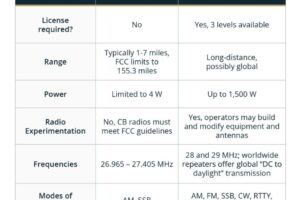
CB radios use 40 channels within the frequency band of 26.965 MHz to 27.405 MHz. These frequencies are distinct from those used by TV broadcasts, which typically range from 54 MHz to 890 MHz. Despite the difference, powerful CB radio signals can sometimes bleed into TV frequencies. This is especially true if the CB radio is not properly tuned or if the antenna is poorly placed.Transmission Methods
CB radios transmit signals using amplitude modulation (AM) or single sideband modulation (SSB). AM is the most common method, making it accessible for everyday users. AM transmission is more prone to interference, which is why it can sometimes affect nearby electronics. SSB, on the other hand, is less likely to cause interference due to its narrower bandwidth. Understanding these transmission methods helps in troubleshooting interference issues. If you experience TV signal disruption, checking the modulation type could be a practical step. — Have you ever noticed your TV acting up when your neighbor uses their CB radio? This could be due to the reasons mentioned above. What steps do you think you could take to minimize this interference?Tv Signal Basics
Understanding TV signal basics is important when discussing potential interference from CB radios. TV signals can be affected by various external factors. Knowing the difference between analog and digital signals, as well as how signal reception works, can help you grasp the impact of CB radio interference on your TV.
Analog Vs Digital
TV signals come in two types: analog and digital. Analog signals are the older technology. They deliver continuous waves that vary in amplitude. These signals are more prone to interference. Digital signals, on the other hand, use binary code. They are less susceptible to noise and provide better picture quality. Transitioning from analog to digital has improved TV reception for many users.
Signal Reception
Signal reception is how your TV receives broadcast signals. An antenna captures the signals from the air. The TV then decodes these signals into audio and video. Different factors affect signal reception. Distance from the broadcast tower is one. Physical obstructions like buildings or trees can also impact it. Weather conditions play a role too. Proper antenna positioning can enhance signal quality.
Potential Interference Causes
Cb radio can cause interference with TV signals. This happens when both devices use similar frequencies. Proper equipment and setup can help reduce this issue.
In today’s modern world, it’s not uncommon to experience interference between different electronic devices. One common issue many face is the interference of CB radio with television signals. Let’s explore some potential causes of this interference to help you understand and potentially solve the issue.Signal Overlap
Signal overlap occurs when the frequencies used by your CB radio and your television set are too close to each other. This can cause your TV to pick up parts of the CB radio signal, resulting in a disrupted viewing experience. Imagine you’re watching your favorite show, and suddenly, you hear someone talking through your TV speakers. Frustrating, right? This overlap can happen if your CB radio is transmitting on a frequency that your TV is sensitive to. You might need to check the frequency ranges of both devices. Adjusting the settings or moving the devices further apart can sometimes help reduce this issue.Equipment Issues
Equipment issues are another common cause of interference. Poorly shielded cables, outdated equipment, or even faulty connections can lead to your CB radio interfering with your TV. Have you ever had an old TV that just didn’t seem to work right no matter what you did? Older televisions might lack the proper shielding needed to block out interference from other devices. You can start by inspecting your TV and CB radio setup. Ensure all connections are secure and consider upgrading any old or worn-out cables. Sometimes, simply replacing a cheap cable with a higher quality one can make a significant difference. Addressing these equipment issues can often mitigate or entirely eliminate the interference, allowing you to enjoy both your CB radio and TV without any hitches.Cb Radio Interference Symptoms
CB radio interference can disrupt your TV viewing experience. Knowing the symptoms helps identify the problem and seek solutions. Common symptoms include poor TV reception and audio disturbances.
Poor Tv Reception
Poor TV reception is a clear sign of CB radio interference. You may notice pixelated images or fuzzy screens. The TV signal may weaken or drop completely. Changing channels might not help. All channels could show poor reception. This happens because CB radio signals can overlap with TV signals.
Audio Disturbances
Audio disturbances are another symptom of CB radio interference. You may hear static or buzzing sounds on your TV. Voices from CB radios can mix with your TV audio. This makes it hard to hear the TV program. Sometimes the audio cuts out entirely. These disturbances can be very annoying.
Credit: www.amazon.com
Testing For Interference
Testing for interference is crucial to determine if a CB radio disrupts your TV. Interference can cause signal problems. To fix it, you need to identify the source and use diagnostic tools.
Identifying Sources
First, check all nearby devices. CB radios, TVs, and other electronics can interfere. Turn each device off one by one. Watch the TV for changes. This can help find the culprit.
Also, inspect the TV antenna. A loose or damaged antenna can pick up interference. Make sure all connections are tight and secure. Replace any damaged parts.
Diagnostic Tools
Use a spectrum analyzer. This tool shows the frequencies around you. It can help find interference. You can also use a handheld RF detector. This device detects radio signals. Move it around your home. It will beep when near a strong signal.
Another tool is a TV signal meter. This device measures TV signal strength. It can show if interference is affecting your signal. Use it to find the best antenna position.
Preventing Interference
Cb radios can interfere with TV signals, causing static or disrupted reception. Proper setup and shielding reduce this risk. Ensuring cables and equipment are well-maintained helps maintain clear TV viewing.
If you’ve ever experienced TV interference from your CB radio, you’re not alone. This kind of interference can be a frustrating experience, but it’s something you can prevent with the right steps. Ensuring your TV and CB radio coexist harmoniously is all about proper equipment use and correct installation.Proper Equipment Use
Using the right equipment is crucial. Ensure your CB radio and TV have good quality cables. Low-quality cables can be prone to leaks and interference. Also, consider using ferrite beads on your cables. They help reduce RF interference. Always keep your CB radio and TV at a reasonable distance from each other. The closer they are, the more likely they are to interfere with each other. Try to place them in separate rooms if possible.Installation Tips
When setting up your CB radio, install it away from other electronic devices. This reduces the chances of interference. Use proper grounding techniques to avoid signal disruptions. Make sure your antenna is correctly installed. A poorly installed antenna can cause interference. It should be placed as high as possible and away from your TV antenna. What’s your experience with CB radio interference? Have you found any other tips that work well? Share your thoughts below!Credit: www.ebay.com
Legal Regulations
Legal regulations play a significant role in ensuring CB radios do not interfere with TV signals. Understanding these regulations helps you avoid any legal issues while using your CB radio.
Fcc Guidelines
The Federal Communications Commission (FCC) sets guidelines for the use of CB radios. These rules are designed to prevent interference with other electronic devices, including TVs.
According to the FCC, CB radios must operate on specific frequencies and power levels. Exceeding these limits can cause interference with TV signals.
Moreover, the FCC requires that CB radios be certified to meet certain technical standards. This certification ensures your CB radio is less likely to cause interference.
Compliance Measures
Compliance with FCC guidelines is crucial. Ensure your CB radio is properly tuned and maintained to avoid interference.
Regularly check your CB radio’s settings and make sure it operates within the legal frequency and power limits. This simple measure can prevent many issues.
Additionally, if you experience interference, try relocating your CB radio or adjusting its antenna. Sometimes, minor adjustments can make a significant difference.
Have you ever wondered if your CB radio setup might be causing TV interference? By adhering to these legal regulations, you can use your CB radio without any concerns.
Case Studies
CB radio signals can cause interference with TV reception. This issue often occurs due to overlapping frequencies. Proper shielding and filters can help reduce this problem.
In this section, we will explore some real-life case studies to understand how CB radios can interfere with TVs. By examining these scenarios, we can identify the solutions that were implemented to resolve the interference issues. This will help you learn how to tackle similar problems you might face.Real-life Examples
One day, John, an avid CB radio user, noticed that every time he transmitted, his neighbor’s TV signal got disrupted. The neighbor complained about the picture getting fuzzy and sound cutting out. John was puzzled but wanted to maintain good relations with his neighbor. In another case, a truck driver named Sarah faced interference issues whenever she parked her vehicle near her home. Her family would complain about TV channels getting distorted. This issue was causing frustration at home.Solutions Implemented
John decided to investigate the issue. He first checked if his CB radio was functioning correctly and confirmed it was. Then, he moved his antenna away from the shared wall and added a low-pass filter to reduce interference. This solved the problem, and his neighbor’s TV signal was clear again. Sarah, on the other hand, consulted with a local technician. The technician suggested adding ferrite beads to the TV cables to block unwanted signals. Sarah followed the advice and found that the TV interference stopped. These solutions might seem small, but they made a big difference. Have you ever faced similar issues with electronic devices interfering with each other? If so, what steps did you take to resolve them? Feel free to share your experiences and tips in the comments below! By sharing our experiences, we can help each other find quick and effective solutions.Credit: www.walmart.com
Frequently Asked Questions
How Do I Stop Cb Radio Interference On My Tv?
Use a high-pass filter on your TV antenna cable. Shield cables and connections to reduce interference. Ensure proper grounding of your equipment.
Will A Cb Radio Interfere With Digital Tv?
A CB radio typically doesn’t interfere with digital TV signals. Proper installation and avoiding shared antennas reduce any risk of interference.
What Keeps Interfering With Tv Signal?
TV signal interference can be caused by physical obstructions, weather conditions, electronic devices, and outdated equipment. Nearby buildings, mountains, and trees can block signals. Rain, snow, and wind can disrupt reception. Mobile phones, microwaves, and Wi-Fi routers can create interference.
Ensure your antenna and cables are in good condition for optimal performance.
How Do I Stop Electrical Interference On My Cb Radio?
Reduce electrical interference on your CB radio by using noise filters, grounding your equipment properly, and keeping power cables separated. Ensure all connections are secure and use quality coaxial cables. Regularly inspect and maintain your radio system for optimal performance.
Conclusion
Understanding CB radio interference with TV signals is crucial. Simple steps can minimize issues. Use quality cables and proper grounding. Move antennas away from each other. These efforts can create a smoother viewing experience. No more signal disruptions. Enjoy your TV time without frustration.
Troubleshoot persistently for best results. Always stay informed about new solutions. Effective management enhances both CB radio and TV use.